Notes › Operating System Concepts Essentials (Silberschatz) Lecture 3
Processes
6026 words 34 min Modified
Table of Contents
Process Concept
The Process
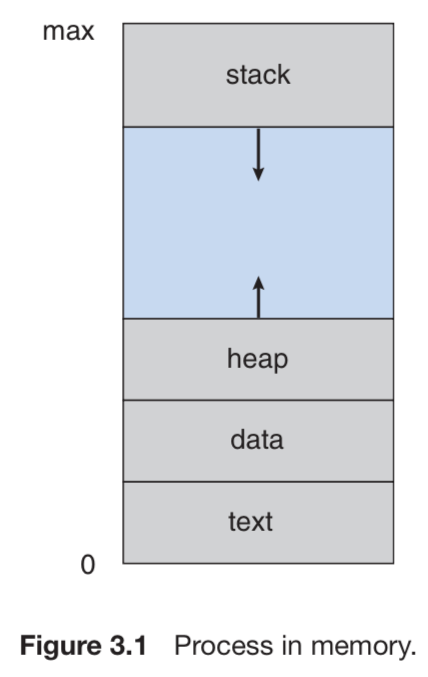
- All running processes include the following:
- Text section: program code
- Current activity: values stored in program counter and other registers
- Process stack: stores temporary data (i.e., function parameters, return addresses, and local variables)
- Data section: global variables
- Process heap: dynamically allocated memory at run time
- Programs are passive and lie around on the disk, whereas processes are active and running
Process State
- A process changes state as it executes
- New: being created
- Running: instructions executing
- Waiting: waiting for some event (i.e., I/O completion or signal)
- Ready: waiting for CPU assignment
- Terminated: completed execution
- Only one process may be “running” on a CPU at any instant
Process Control Block
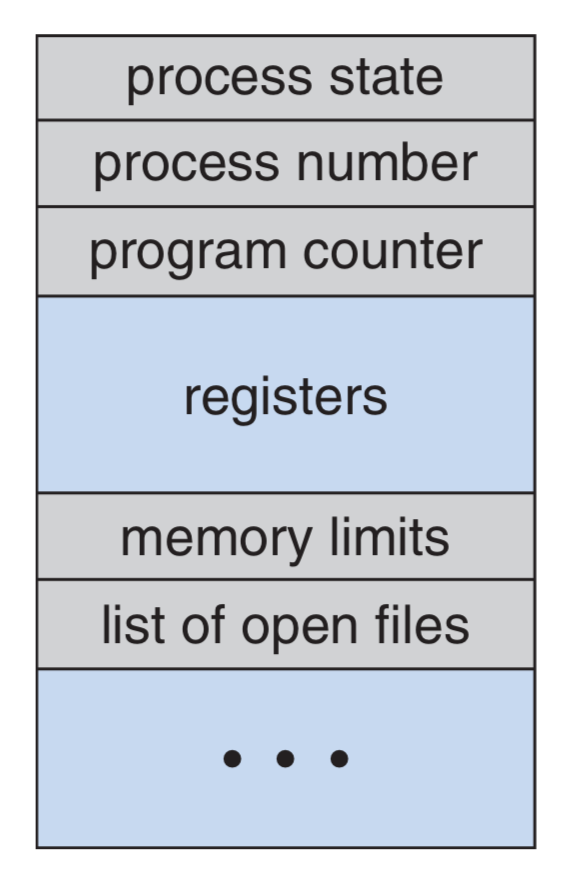
- Processes are represented by a process control block (PCB) containing:
- Process state
- Program counter
- CPU registers (which must be saved when an interrupt occurs!)
- CPU-scheduling info: process priority and pointers to scheduling queues
- Memory-management info: values of base and limit registers, and the page/segment tables
- Accounting info: CPU usage, time executed, account numbers (no reference to this anywhere in the book), and process numbers
- PCB is the repository for any info that may vary across processes
Threads
- Processes can have multiple threads that allow them to perform multiple tasks concurrently
- The PCB expands to include the information for each thread
Process Scheduling
- The process scheduler selects an available process for execution
Scheduling Queues
- The job queue consists of all processes in the system
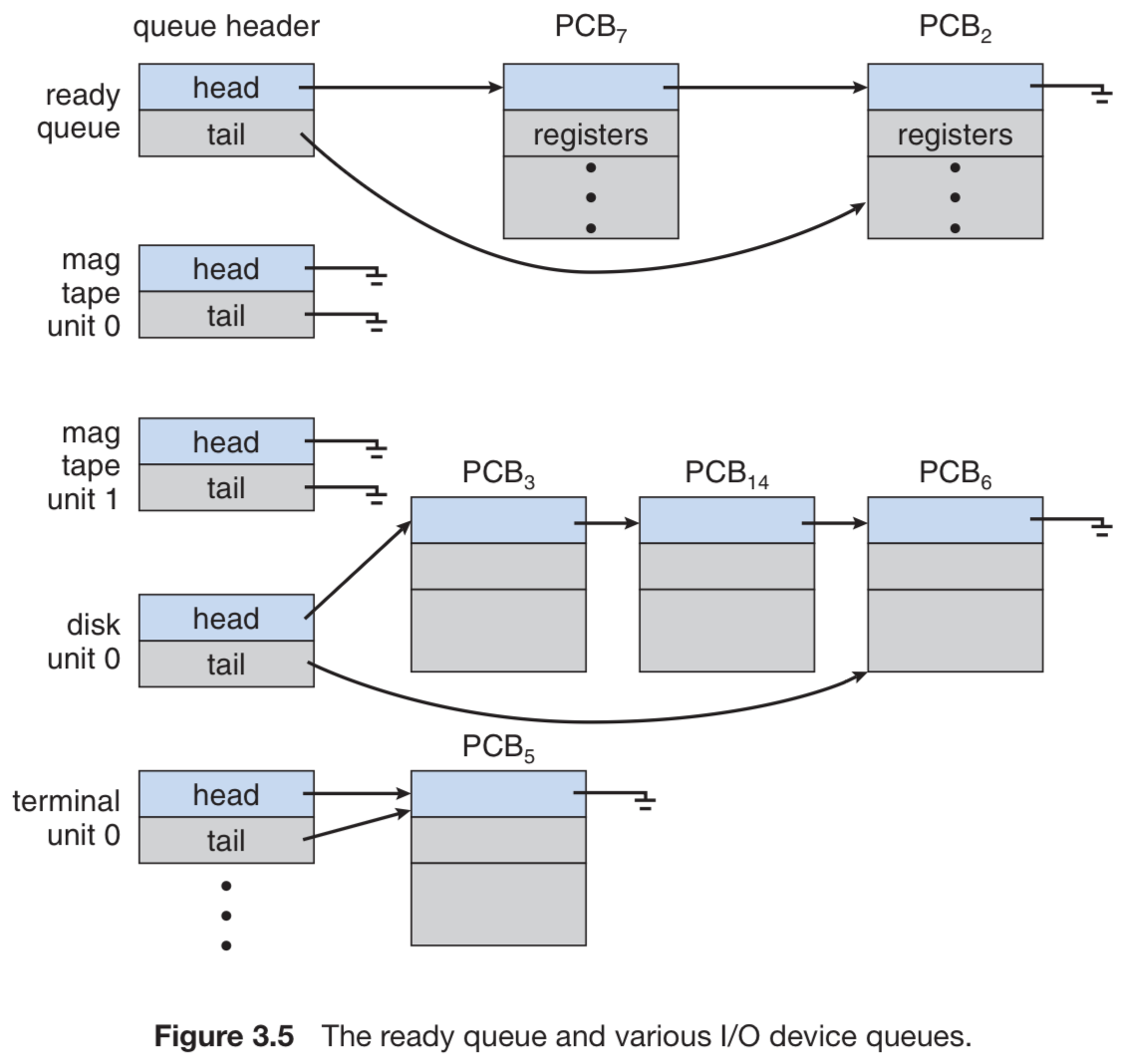
- The ready queue is a linked list of processes in RAM awaiting execution
- The header contains pointers to the first and last PCBs
- Each PCB contains a pointer to the successor PCB
- Device queue: each I/O device maintains a list of processes waiting for it
- Steps of operation:
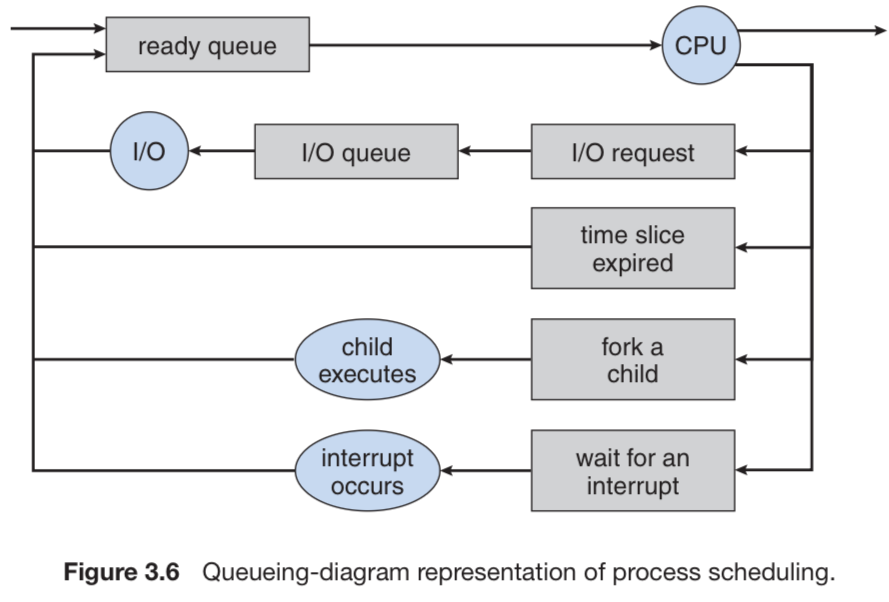
- A new process is put into the ready queue and awaits selection for execution (or being dispatched)
- Three events can occur during execution:
- Process issues an I/O request: the process is placed in an I/O queue
- Process forks itself: wait for child’s termination or run concurrently
fork()fully copies the parent, including the value of the instruction counter, so the child never executes code that ran before it existed
- Process is interrupted: it is forcibly removed from the CPU and put back in the ready queue after some time
- In the first two cases, the process switches from “Waiting” to “Ready” and is placed back into the ready queue
- This is continued until termination: process is removed from all queues and has its PCB and resources deallocated
Schedulers
- Schedulers decide which processes are dispatched from a queue (which kinda contradicts the notion that it’s a queue, since queues are FIFO, but whatever)
- Long-term scheduler selects processes from a process spool stored on the disk and loads them into RAM; they are now ready to execute
- Short-term scheduler selects from processes in the ready queue and allocates the CPU to one at a time
- Degree of multiprogramming: number of processes in memory
- If it’s stable, the rate of process creation equals the rate of process termination
- The long-term scheduler need only be invoked when a process is terminated
- This maintains the aforementioned stability, since a process is only loaded from the spool and sent to the ready queue whenever a job is completed
- Process execution may be described in one of two ways:
- I/O-bound: more time on I/O than computation
- CPU-bound: more time on computation than I/O
- It’s important that the long-term scheduler maintains a homogeneous process mix of I/O-bound and CPU-bound processes
- Too much IO-bound: device queue(s) saturated, ready queue empty
- Too much CPU-bound: ready queue saturated, device queue(s) empty
- Modern OSes have stopped using long-term schedulers
- Instead, the kernel puts processes awaiting dispatch in RAM for the short-term scheduler
- Q: Doesn’t this introduce overhead, since you are no longer distinguishing between I/O-bound and CPU-bound? A: Instead of static classification, the kernel monitors behavior: if a process blocks often on I/O, it is effectively treated as I/O-bound. If it hogs CPU, the scheduler penalizes it with lower priority. So there is no large overhead; the distinction is made dynamically rather than upfront.
- Q: It hasn’t been made clear yet whether the scheduler sends processes for dispatch based on the order they were received; for me, I don’t believe this is the case, since we would want a homogeneous mix of I/O-bound and CPU-bound; but also, since we’re just loading processes into memory and dont distinguish between the two types, it could be possible that it’s FIFO. A: We do distinguish between the two types of processes. Processes are not dispatched in strict arrival order. FIFO is not used as the main scheduling rule. Different algorithms pick the next process based on priority, fairness, and observed behavior.
- Instead, the kernel puts processes awaiting dispatch in RAM for the short-term scheduler
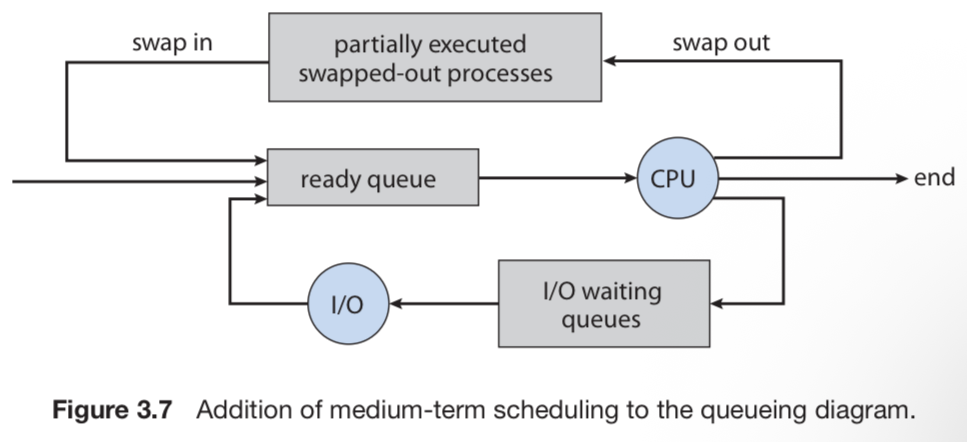
- Modern time-sharing systems incorporate a medium-term scheduler
- This is because it can be advantageous to remove certain processes from RAM that are competing for the CPU
- The process can always be reintroduced into memory where the process left off; this scheme is called swapping
- Typical use cases: free extra memory and improve the process mix
Context Switch
- The kernel must save the current context of a running process when it is suspended due to an interrupt; then, the kernel has to resume the context when the interrupt is completed
- Accomplished via state save and state restore
- Switching the CPU from one process to another requires a state save of the currently-running process and a state restore of the other process; this is known as context switch
- Context switching time is pure overhead and is dependent on RAM speed, the number of registers to be copied, and the existence of special instructions to store/load all registers simultaneously
Process Operations
Process Creation
- Processes have unique identifiers, PIDs
- PIDs can be used as an index to retrieve process attributes from the kernel
- A child can obtain resources directly from the kernel or constrained to a subset of its parent’s resources
- The latter prevents any one process from overloading the system by forking too many times
- A parent can pass initialization data to a child on creation
- When a process forks itself, there are two cases for execution:
- Case 1: the parent executes concurrently with its children
- Case 2: the parent waits until some or all of its children have terminated
- There are also two address-space possibilities for the child:
- The child is a duplicate of the parent
- The child has a new program loaded into it
fork()returns zero for the child and the PID of the child to the parentexec()destroys the memory image of the program making the call, loads a binary file into memory, and starts execution
 1#include <sys/types.h>
 2#include <stdio.h>
 3#include <unistd.h>
 4
 5int main() {
 6
 7pid t pid;
 8
 9/* fork a child process */
10pid = fork();
11if (pid < 0) { /* error occurred */
12  fprintf(stderr, "Fork Failed");
13  return 1;
14}
15
16else if (pid == 0) { /* child process */
17  execlp("/bin/ls","ls",NULL);
18}
19
20else { /* parent process */
21  /* parent will wait for the child to complete */
22  wait(NULL);
23  printf("Child Complete");
24}
25
26return 0;
27}- Process creation/forking is more difficult on Windows and probably not on the exam
Process Termination
- A process is deleted by the kernel once it uses the
exit()syscall- Returns a status valid to its parent via the
wait()syscall
- Returns a status valid to its parent via the
- All process resources (virtual and physical RAM, open files, and I/O buffers) are deallocated by the kernel
- Parents terminate their children for a variety of reasons:
- The child has exceeded its usage the resources allocated to it (the parent would need some way to inspect the state of its children)
- The task assigned to the child is no longer needed
- The parent is exiting, so the child must exit too
- Cascading termination: to terminate a parent, its children must also be terminated; this is a cascading effect that is automatically performed by the kernel if the parent is marked for termination
- If the parent is terminated before it invokes
wait(), however, the children will become orphans andinitis assigned as the new parent initperiodically invokeswait()for orphans, which allows their exit status to be collected and process-table entry released
- If the parent is terminated before it invokes
- A parent process may use
wait()to wait for the termination of a child process- By default
wait()waits for any one child to terminate, and it returns that child’s PID - If a parent has multiple children, this means whichever child finishes first will be reaped
- To specify a particular child, the parent can use
waitpid(child_pid, &status, options) - Returns the child pid once terminated; can pass
&status(assuming status is anint) to also get the exit status of the child
- To specify a particular child, the parent can use
- By default
- The process table contains the exit statuses of all processes until the parent of a terminated process calls
wait()- If the parent hasn’t called
wait(), the child is a zombie process - Once the parent calls
wait(), the pid of the zombie process and its entry in the process table is removed
- If the parent hasn’t called
Interprocess Communication
- Concurrent processes have two classifications:
- Independent: cannot affect nor be affected by other running processes
- Cooperating: can affect and be affected by other running processes
- Cooperating processes need an interprocess communication (IPC) mechanism for exchanging information
- There are two IPC models: shared memory and message passing (which have already been covered in the previous chapter)
- Message passing is the preferred mechanism for IPC, since shared memory has cache coherency issues
Shared-Memory Systems
- Producer-consumer paradigm
- Create a buffer of items that resides in shared memory that can be filled by the producer and emptied by the consumer
- Both processes must be synchronized so that the consumer does not try to consume an item the producer has not yet made
- Two types of buffers:
- Unbounded: no practical limit on buffer size; the main constraint is ensuring the producer is producing faster than the consumer
- Bounded: fixed buffer size; the consumer must wait if the buffer is empty and the producer must wait if the buffer is full
Message-Passing Systems
- Message-passing facility has at least two operations:
send(message)andreceive(message) - Messages can be fixed or variable
- Fixed messages are harder for the programmer to implement but easy for the kernel to send
- Vice-versa for variable messages
- Processs $P$ and $Q$ require a communication link
Naming
- Processes need a way to refer to one another
- Direct communication (symmetric): each process must explicitly name the recipient/sender of the communication
send(P, message)andreceive(Q, message)- A link is automatically established between any two processes that want to communicate, but both processes must know one another’s identity
- There exists exactly one link between each pair of processes
- Each link is associated with exactly two processes
- Direct communication (asymmetric): the sender names the recipient, but the recipient doesn’t need to name the sender
send(P, message)andreceive(id, message)
- Direct communication (symmetric): each process must explicitly name the recipient/sender of the communication
- Direct communication is bad because you’re hard-coding the PIDs
- Indirect communication: messages are sent and received via shared mailboxes
send(A, message)andreceive(A, message)- Link is established between processes only if they are using the same mailbox
- A link may have more than two processes
- There can be multiple different links between the same two processes if each link is on a distinct mailbox
- Indirect communication: messages are sent and received via shared mailboxes
- If more than one process is receiving on the same mailbox, we must choose one implementation:
- Links may only be associated between pairs
- At most one process at a time can
receive() - The system selects which process receives the message via an algorithm
- Mailboxes can be owned by processes or the kernel
- Owned by a process: it is trivial to identify which process is receiving all messages sent over the mailbox; if the process terminates, the mailbox disappears
- Owned by the kernel: the mailbox is independent and not attached to any process
- The kernel must provide a mechanism a process to:
- Create new mailboxes
- Send/receive messages through mailboxes
- Delete mailboxes
Synchronization
- Message-passing is either blocking (synchronous) or nonblocking (asynchronous)
- Design options for
send()andreceive():- Blocking send: the sender is blocked until the message is received
- Nonblocking send: the sender sends the message and resumes operation
- Blocking receive: the receiver blocks until a message is available
- Nonblocking receive: the receiver retrieves either a valid message or a null
- When both the sender and receiver are blocking, there exists a rendezvous between them
- This is a trivial solution to the producer-consumer problem, since both parties will just wait for the other
Buffering
- Messages between processes are held in a queue, or buffer
- Three implementations:
- Zero capacity: the queue has length 0
- Since there cannot be any waiting messages, the sender is forced into blocking mode until the receiver receives the message
- This is sometimes referred to as a “no buffering” system
- Bounded capacity: the queue has finite length $n$
- If the queue is not full, new messages are placed in the buffer, and the sender continues execution immediately
- If the queue is full, the sender goes into blocking mode until the receiver removes at least one message from the buffer
- Unbounded capacity: the queue length is infinite
- The sender never blocks
- Messages accumulate in the queue until the receiver consumes them (at whatever rate the receiver runs)
- Zero capacity: the queue has length 0
Examples of IPC Systems
- I didn’t take notes on this section because it’s out of the scope of the exam, but it was still very interesting to read; I will definitely revisit this some day
Communication in Client-Server Systems
Sockets
- Socket: endpoint for communication
- Identified via an IP address concatenated with a port number
- Uses client-server architecture
- The server listens on a port for incoming client requests and establishes a connection once a request is received
- Java provides different sockets
- Connection-oriented (TCP):
Socket - Connectionless (UDP):
DatagramSocketandMulticastSocket(subclass of the former)
- Connection-oriented (TCP):
 1import java.net.*;
 2import java.io.*;
 3
 4public class DateServer {
 5
 6public static void main(String[] args) {
 7try {
 8ServerSocket sock = new ServerSocket(6013);
 9
10/* now listen for connections */
11while (true) {
12Socket client = sock.accept();
13
14PrintWriter pout = new
15PrintWriter(client.getOutputStream(), true);
16
17/* write the Date to the socket */
18pout.println(new java.util.Date().toString());
19
20/* close the socket and resume */
21/* listening for connections */
22client.close();
23}
24}
25
26catch (IOException ioe) {
27System.err.println(ioe);
28}
29}
30} 1import java.net.*;
2import java.io.*;
3
4public class DateClient {
5public static void main(String[] args) {
6try {
7
8/* make connection to server socket */
9Socket sock = new Socket("127.0.0.1",6013);
10
11InputStream in = sock.getInputStream();
12BufferedReader bin = new BufferedReader(new InputStreamReader(in));
13
14/* read the date from the socket */
15String line;
16while ( (line = bin.readLine()) != null)
17System.out.println(line);
18
19/* close the socket connection*/
20sock.close();
21}
22
23catch (IOException ioe) {
24System.err.println(ioe);
25}
26}
27}127.0.0.1is loopback IP address a computer can use to refer to itself- This allows a client and server on the same host to communicate with one another
- Sockets are pretty low-level due to the unstructured form of data transfer (raw byte stream) between the processes
- It is the responsibility of the client/server application to impose a common structure on the byte stream
Remote Procedure Calls
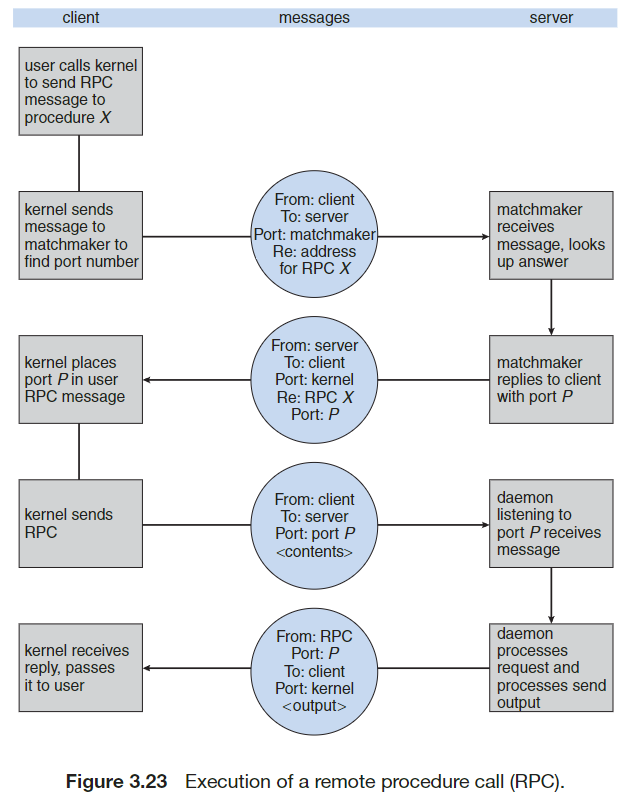
- Allows a client to call a function on a server in a network
- Built on top of IPC message-based communication
- Messages are structured as follows:
- Addressed to a specific port (on which an RPC daemon resides) in the beginning of the message
- Contains function identifier and parameters
- Server executes the function and returns results in a reply message
- Stub system:
- Client invokes a remote procedure via an auto-generated stub given by the server
- This is typically compiled from some configuration file on the server and given to the client beforehand to call in their code
- Marshalling: Client-side stub package parameters into transmittable format
- Unmarshalling: Server-side stub unpacks and executes function
- Results sent back via same mechanism (why not just use an api?????)
- Client invokes a remote procedure via an auto-generated stub given by the server
- Data representation:
- Machines differ in endian order for storing data
- To fix this, RPC systems use External Data Representation (XDR), which is a data representation format independent of endianness
- Semantics of RPC calls:
- Local procedure calls fail rarely, but RPCs may fail or duplicate due to network errors
- Two approaches:
- At most once: attach timestamp to messages, server ignores repeats, ensures no duplication
- Exactly once: adds acknowledgment (ACK) messages, client resends until ACK received
- Binding:
- A mechanism used to determine port numbers of the RPC daemon if the port number is not hardcoded in the client request
- A rendezvous daemon on the server receives a message with the RPC name and sends the correct
- RPC is useful for implementing a distributed file system as a set of RPC daemons/clients
Pipes
Ordinary Pipes
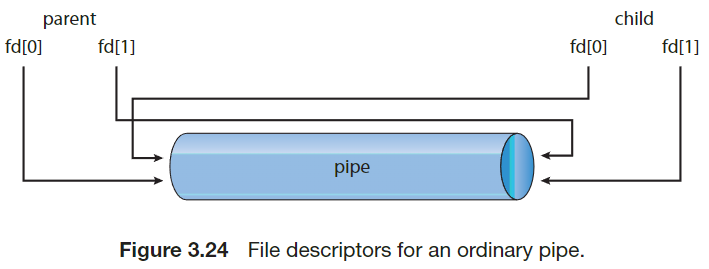
- Allow two processes to communicate in a producer-consumer manner (requires parent-child relationship)
- Producer writes to the write-end and the consumer reads from the read-end
- One-way communication
- Ceases to exist once the processes have finished communicating and have terminated
pipe(int fd[])creates a pipe accessible through the array of file descriptors;fd[0]is read-end andfd[1]is write-end- Pipes in UNIX can be accessed using
read()andwrite()syscalls, as they are technically still files
- Pipes in UNIX can be accessed using
- Cannot be accessed from outside the process that created it
- Parents can use pipes to communicate with forked processes
- The children inherit the pipe file descriptors from the parent
- The parent closes its reference to
fd[0]and the child closes its reference tofd[1]
- Known as anonymous pipes on Windows
- Need to specify which attributes the child inherits (
SECURITY_ATTRIBUTES)
- Need to specify which attributes the child inherits (
Named Pipes
- More powerful than ordinary pipes
- Allow for bidirectional communication
- Does not require parent-child relationship
- Can be used by more than two processes
- Continues to exist until explicitly deleted
- FIFOs in UNIX
- Appear as typical files in the file system
- Created with
mkfifo() - Can be manipulated with
open(), read(), write(),andclose() - Half-duplex by nature
- Support for full-duplex, seamless communication can be achieved using two FIFOs
- All communicating processes must reside on the same machine; otherwise, sockets are required
- Only byte streams are permitted
- Named pipes in Windows
- Full-duplex by nature
- Communicating processes may reside on different machines
- Byte streams and messages are permitted
References
-
-
Process Concept
The Process
- All running processes include the following:
- Text section: program code
- Current activity: values stored in program counter and other registers
- Process stack: stores temporary data (i.e., function parameters, return addresses, and local variables)
- Data section: global variables
- Process heap: dynamically allocated memory at run time
- Programs are passive and lie around on the disk, whereas processes are active and running
Process State
- A process changes state as it executes
- New: being created
- Running: instructions executing
- Waiting: waiting for some event (i.e., I/O completion or signal)
- Ready: waiting for CPU assignment
- Terminated: completed execution
- Only one process may be “running” on a CPU at any instant
Process Control Block
- Processes are represented by a process control block (PCB) containing:
- Process state
- Program counter
- CPU registers (which must be saved when an interrupt occurs!)
- CPU-scheduling info: process priority and pointers to scheduling queues
- Memory-management info: values of base and limit registers, and the page/segment tables
- Accounting info: CPU usage, time executed, account numbers (no reference to this anywhere in the book), and process numbers
- PCB is the repository for any info that may vary across processes
Threads
- Processes can have multiple threads that allow them to perform multiple tasks concurrently
- The PCB expands to include the information for each thread
Process Scheduling
- The process scheduler selects an available process for execution
Scheduling Queues
- The job queue consists of all processes in the system
- The ready queue is a linked list of processes in RAM awaiting execution
- The header contains pointers to the first and last PCBs
- Each PCB contains a pointer to the successor PCB
- Device queue: each I/O device maintains a list of processes waiting for it
- Steps of operation:
- A new process is put into the ready queue and awaits selection for execution (or being dispatched)
- Three events can occur during execution:
- Process issues an I/O request: the process is placed in an I/O queue
- Process forks itself: wait for child’s termination or run concurrently
fork()fully copies the parent, including the value of the instruction counter, so the child never executes code that ran before it existed
- Process is interrupted: it is forcibly removed from the CPU and put back in the ready queue after some time
- In the first two cases, the process switches from “Waiting” to “Ready” and is placed back into the ready queue
- This is continued until termination: process is removed from all queues and has its PCB and resources deallocated
Schedulers
- Schedulers decide which processes are dispatched from a queue (which kinda contradicts the notion that it’s a queue, since queues are FIFO, but whatever)
- Long-term scheduler selects processes from a process spool stored on the disk and loads them into RAM; they are now ready to execute
- Short-term scheduler selects from processes in the ready queue and allocates the CPU to one at a time
- Degree of multiprogramming: number of processes in memory
- If it’s stable, the rate of process creation equals the rate of process termination
- The long-term scheduler need only be invoked when a process is terminated
- This maintains the aforementioned stability, since a process is only loaded from the spool and sent to the ready queue whenever a job is completed
- Process execution may be described in one of two ways:
- I/O-bound: more time on I/O than computation
- CPU-bound: more time on computation than I/O
- It’s important that the long-term scheduler maintains a homogeneous process mix of I/O-bound and CPU-bound processes
- Too much IO-bound: device queue(s) saturated, ready queue empty
- Too much CPU-bound: ready queue saturated, device queue(s) empty
- Modern OSes have stopped using long-term schedulers
- Instead, the kernel puts processes awaiting dispatch in RAM for the short-term scheduler
- Q: Doesn’t this introduce overhead, since you are no longer distinguishing between I/O-bound and CPU-bound? A: Instead of static classification, the kernel monitors behavior: if a process blocks often on I/O, it is effectively treated as I/O-bound. If it hogs CPU, the scheduler penalizes it with lower priority. So there is no large overhead; the distinction is made dynamically rather than upfront.
- Q: It hasn’t been made clear yet whether the scheduler sends processes for dispatch based on the order they were received; for me, I don’t believe this is the case, since we would want a homogeneous mix of I/O-bound and CPU-bound; but also, since we’re just loading processes into memory and dont distinguish between the two types, it could be possible that it’s FIFO. A: We do distinguish between the two types of processes. Processes are not dispatched in strict arrival order. FIFO is not used as the main scheduling rule. Different algorithms pick the next process based on priority, fairness, and observed behavior.
- Instead, the kernel puts processes awaiting dispatch in RAM for the short-term scheduler
- Modern time-sharing systems incorporate a medium-term scheduler
- This is because it can be advantageous to remove certain processes from RAM that are competing for the CPU
- The process can always be reintroduced into memory where the process left off; this scheme is called swapping
- Typical use cases: free extra memory and improve the process mix
Context Switch
- The kernel must save the current context of a running process when it is suspended due to an interrupt; then, the kernel has to resume the context when the interrupt is completed
- Accomplished via state save and state restore
- Switching the CPU from one process to another requires a state save of the currently-running process and a state restore of the other process; this is known as context switch
- Context switching time is pure overhead and is dependent on RAM speed, the number of registers to be copied, and the existence of special instructions to store/load all registers simultaneously
Process Operations
Process Creation
- Processes have unique identifiers, PIDs
- PIDs can be used as an index to retrieve process attributes from the kernel
- A child can obtain resources directly from the kernel or constrained to a subset of its parent’s resources
- The latter prevents any one process from overloading the system by forking too many times
- A parent can pass initialization data to a child on creation
- When a process forks itself, there are two cases for execution:
- Case 1: the parent executes concurrently with its children
- Case 2: the parent waits until some or all of its children have terminated
- There are also two address-space possibilities for the child:
- The child is a duplicate of the parent
- The child has a new program loaded into it
fork()returns zero for the child and the PID of the child to the parentexec()destroys the memory image of the program making the call, loads a binary file into memory, and starts execution
1#include <sys/types.h> 2#include <stdio.h> 3#include <unistd.h> 4 5int main() { 6 7pid t pid; 8 9/* fork a child process */ 10pid = fork(); 11if (pid < 0) { /* error occurred */ 12 fprintf(stderr, "Fork Failed"); 13 return 1; 14} 15 16else if (pid == 0) { /* child process */ 17 execlp("/bin/ls","ls",NULL); 18} 19 20else { /* parent process */ 21 /* parent will wait for the child to complete */ 22 wait(NULL); 23 printf("Child Complete"); 24} 25 26return 0; 27}- Process creation/forking is more difficult on Windows and probably not on the exam
Process Termination
- A process is deleted by the kernel once it uses the
exit()syscall- Returns a status valid to its parent via the
wait()syscall
- Returns a status valid to its parent via the
- All process resources (virtual and physical RAM, open files, and I/O buffers) are deallocated by the kernel
- Parents terminate their children for a variety of reasons:
- The child has exceeded its usage the resources allocated to it (the parent would need some way to inspect the state of its children)
- The task assigned to the child is no longer needed
- The parent is exiting, so the child must exit too
- Cascading termination: to terminate a parent, its children must also be terminated; this is a cascading effect that is automatically performed by the kernel if the parent is marked for termination
- If the parent is terminated before it invokes
wait(), however, the children will become orphans andinitis assigned as the new parent initperiodically invokeswait()for orphans, which allows their exit status to be collected and process-table entry released
- If the parent is terminated before it invokes
- A parent process may use
wait()to wait for the termination of a child process- By default
wait()waits for any one child to terminate, and it returns that child’s PID - If a parent has multiple children, this means whichever child finishes first will be reaped
- To specify a particular child, the parent can use
waitpid(child_pid, &status, options) - Returns the child pid once terminated; can pass
&status(assuming status is anint) to also get the exit status of the child
- To specify a particular child, the parent can use
- By default
- The process table contains the exit statuses of all processes until the parent of a terminated process calls
wait()- If the parent hasn’t called
wait(), the child is a zombie process - Once the parent calls
wait(), the pid of the zombie process and its entry in the process table is removed
- If the parent hasn’t called
Interprocess Communication
- Concurrent processes have two classifications:
- Independent: cannot affect nor be affected by other running processes
- Cooperating: can affect and be affected by other running processes
- Cooperating processes need an interprocess communication (IPC) mechanism for exchanging information
- There are two IPC models: shared memory and message passing (which have already been covered in the previous chapter)
- Message passing is the preferred mechanism for IPC, since shared memory has cache coherency issues
Shared-Memory Systems
- Producer-consumer paradigm
- Create a buffer of items that resides in shared memory that can be filled by the producer and emptied by the consumer
- Both processes must be synchronized so that the consumer does not try to consume an item the producer has not yet made
- Two types of buffers:
- Unbounded: no practical limit on buffer size; the main constraint is ensuring the producer is producing faster than the consumer
- Bounded: fixed buffer size; the consumer must wait if the buffer is empty and the producer must wait if the buffer is full
Message-Passing Systems
- Message-passing facility has at least two operations:
send(message)andreceive(message) - Messages can be fixed or variable
- Fixed messages are harder for the programmer to implement but easy for the kernel to send
- Vice-versa for variable messages
- Processs $P$ and $Q$ require a communication link
Naming
- Processes need a way to refer to one another
- Direct communication (symmetric): each process must explicitly name the recipient/sender of the communication
send(P, message)andreceive(Q, message)- A link is automatically established between any two processes that want to communicate, but both processes must know one another’s identity
- There exists exactly one link between each pair of processes
- Each link is associated with exactly two processes
- Direct communication (asymmetric): the sender names the recipient, but the recipient doesn’t need to name the sender
send(P, message)andreceive(id, message)
- Direct communication (symmetric): each process must explicitly name the recipient/sender of the communication
- Direct communication is bad because you’re hard-coding the PIDs
- Indirect communication: messages are sent and received via shared mailboxes
send(A, message)andreceive(A, message)- Link is established between processes only if they are using the same mailbox
- A link may have more than two processes
- There can be multiple different links between the same two processes if each link is on a distinct mailbox
- Indirect communication: messages are sent and received via shared mailboxes
- If more than one process is receiving on the same mailbox, we must choose one implementation:
- Links may only be associated between pairs
- At most one process at a time can
receive() - The system selects which process receives the message via an algorithm
- Mailboxes can be owned by processes or the kernel
- Owned by a process: it is trivial to identify which process is receiving all messages sent over the mailbox; if the process terminates, the mailbox disappears
- Owned by the kernel: the mailbox is independent and not attached to any process
- The kernel must provide a mechanism a process to:
- Create new mailboxes
- Send/receive messages through mailboxes
- Delete mailboxes
Synchronization
- Message-passing is either blocking (synchronous) or nonblocking (asynchronous)
- Design options for
send()andreceive():- Blocking send: the sender is blocked until the message is received
- Nonblocking send: the sender sends the message and resumes operation
- Blocking receive: the receiver blocks until a message is available
- Nonblocking receive: the receiver retrieves either a valid message or a null
- When both the sender and receiver are blocking, there exists a rendezvous between them
- This is a trivial solution to the producer-consumer problem, since both parties will just wait for the other
Buffering
- Messages between processes are held in a queue, or buffer
- Three implementations:
- Zero capacity: the queue has length 0
- Since there cannot be any waiting messages, the sender is forced into blocking mode until the receiver receives the message
- This is sometimes referred to as a “no buffering” system
- Bounded capacity: the queue has finite length $n$
- If the queue is not full, new messages are placed in the buffer, and the sender continues execution immediately
- If the queue is full, the sender goes into blocking mode until the receiver removes at least one message from the buffer
- Unbounded capacity: the queue length is infinite
- The sender never blocks
- Messages accumulate in the queue until the receiver consumes them (at whatever rate the receiver runs)
- Zero capacity: the queue has length 0
Examples of IPC Systems
- I didn’t take notes on this section because it’s out of the scope of the exam, but it was still very interesting to read; I will definitely revisit this some day
Communication in Client-Server Systems
Sockets
- Socket: endpoint for communication
- Identified via an IP address concatenated with a port number
- Uses client-server architecture
- The server listens on a port for incoming client requests and establishes a connection once a request is received
- Java provides different sockets
- Connection-oriented (TCP):
Socket - Connectionless (UDP):
DatagramSocketandMulticastSocket(subclass of the former)
- Connection-oriented (TCP):
1import java.net.*; 2import java.io.*; 3 4public class DateServer { 5 6public static void main(String[] args) { 7try { 8ServerSocket sock = new ServerSocket(6013); 9 10/* now listen for connections */ 11while (true) { 12Socket client = sock.accept(); 13 14PrintWriter pout = new 15PrintWriter(client.getOutputStream(), true); 16 17/* write the Date to the socket */ 18pout.println(new java.util.Date().toString()); 19 20/* close the socket and resume */ 21/* listening for connections */ 22client.close(); 23} 24} 25 26catch (IOException ioe) { 27System.err.println(ioe); 28} 29} 30}1import java.net.*; 2import java.io.*; 3 4public class DateClient { 5public static void main(String[] args) { 6try { 7 8/* make connection to server socket */ 9Socket sock = new Socket("127.0.0.1",6013); 10 11InputStream in = sock.getInputStream(); 12BufferedReader bin = new BufferedReader(new InputStreamReader(in)); 13 14/* read the date from the socket */ 15String line; 16while ( (line = bin.readLine()) != null) 17System.out.println(line); 18 19/* close the socket connection*/ 20sock.close(); 21} 22 23catch (IOException ioe) { 24System.err.println(ioe); 25} 26} 27}127.0.0.1is loopback IP address a computer can use to refer to itself- This allows a client and server on the same host to communicate with one another
- Sockets are pretty low-level due to the unstructured form of data transfer (raw byte stream) between the processes
- It is the responsibility of the client/server application to impose a common structure on the byte stream
Remote Procedure Calls
- Allows a client to call a function on a server in a network
- Built on top of IPC message-based communication
- Messages are structured as follows:
- Addressed to a specific port (on which an RPC daemon resides) in the beginning of the message
- Contains function identifier and parameters
- Server executes the function and returns results in a reply message
- Stub system:
- Client invokes a remote procedure via an auto-generated stub given by the server
- This is typically compiled from some configuration file on the server and given to the client beforehand to call in their code
- Marshalling: Client-side stub package parameters into transmittable format
- Unmarshalling: Server-side stub unpacks and executes function
- Results sent back via same mechanism (why not just use an api?????)
- Client invokes a remote procedure via an auto-generated stub given by the server
- Data representation:
- Machines differ in endian order for storing data
- To fix this, RPC systems use External Data Representation (XDR), which is a data representation format independent of endianness
- Semantics of RPC calls:
- Local procedure calls fail rarely, but RPCs may fail or duplicate due to network errors
- Two approaches:
- At most once: attach timestamp to messages, server ignores repeats, ensures no duplication
- Exactly once: adds acknowledgment (ACK) messages, client resends until ACK received
- Binding:
- A mechanism used to determine port numbers of the RPC daemon if the port number is not hardcoded in the client request
- A rendezvous daemon on the server receives a message with the RPC name and sends the correct
- RPC is useful for implementing a distributed file system as a set of RPC daemons/clients
Pipes
Ordinary Pipes
- Allow two processes to communicate in a producer-consumer manner (requires parent-child relationship)
- Producer writes to the write-end and the consumer reads from the read-end
- One-way communication
- Ceases to exist once the processes have finished communicating and have terminated
pipe(int fd[])creates a pipe accessible through the array of file descriptors;fd[0]is read-end andfd[1]is write-end- Pipes in UNIX can be accessed using
read()andwrite()syscalls, as they are technically still files
- Pipes in UNIX can be accessed using
- Cannot be accessed from outside the process that created it
- Parents can use pipes to communicate with forked processes
- The children inherit the pipe file descriptors from the parent
- The parent closes its reference to
fd[0]and the child closes its reference tofd[1]
- Known as anonymous pipes on Windows
- Need to specify which attributes the child inherits (
SECURITY_ATTRIBUTES)
- Need to specify which attributes the child inherits (
Named Pipes
- More powerful than ordinary pipes
- Allow for bidirectional communication
- Does not require parent-child relationship
- Can be used by more than two processes
- Continues to exist until explicitly deleted
- FIFOs in UNIX
- Appear as typical files in the file system
- Created with
mkfifo() - Can be manipulated with
open(), read(), write(),andclose() - Half-duplex by nature
- Support for full-duplex, seamless communication can be achieved using two FIFOs
- All communicating processes must reside on the same machine; otherwise, sockets are required
- Only byte streams are permitted
- Named pipes in Windows
- Full-duplex by nature
- Communicating processes may reside on different machines
- Byte streams and messages are permitted
References
-
-
(embed cycle: 03 Processes)
-
Course slides: Processes Threads
-
Practice 3 solutions
- All running processes include the following:
-
Course slides: Processes Threads
-
Practice 3 solutions
Sources
- Course slides: Processes Threads
- Practice 3 solutions
- Silberschatz, Galvin & Gagne, Operating System Concepts Essentials