Notes › Operating System Concepts Essentials (Silberschatz) Lecture 2
OS Structures
2072 words 12 min Modified
Table of Contents
OS Services
Services to Help the User
- UI
- CLI: text commands
- Batch interface: Commands are entered into files that are executed
- GUI
- Program execution: load programs into memory, run them, and end them
- I/O: a means to control I/O devices
- File-system manipulation
- Communication: processes can talk to one another on the same/different computer
- Can be implemented via shared memory: different processes RW to a shared section of memory
- Alternatively, message passing: packets between processes are sent between processes
- Error detection: the OS must be able to detect errors in hardware and user programs and take the appropriate action to ensure consistent computing
Services to Ensure Efficient Operation
- Resource allocation
- idrc much about this section and the next section, its pretty obvious
System Calls
- Even the simplest programs can execute many system calls; systems in general execute thousands of syscalls a second
- The programmer doesn’t see this level of detail, however; instead, they design according to an API
- Windows API, POSIX API, and Java API
- Programming languages have a run-time support system, which is a set of libraries and compiler used to run programs
- The support system acts as a syscall interface that intercepts syscalls made by the API and invokes the calls within the kernel, returning the syscall status and return variables
- The layer of abstraction that APIs provide are useful because the caller just has to obey the API and understand what a particular API command does
- Three methods are used to pass parameters to the kernel
- Pass the parameters in registers
- When there are more parameters than available registers, the parameters are stored as a table in memory, and the address is passed in a register
- Push the parameters onto the stack and let the kernel pop them off (theoretic support for unlimited parameters)
Syscall Types
Process Control
- If a syscall terminates a process abnormally or the process causes an error trap, then a memory/core dump is written to disk
- The core dump can then be examined by a debugger
- In either case (whether a process terminates or crashes), the kernel must transfer back control to the invoking command interpreter
- The command interpreter will print any errors, then simply process the next command or wait for further instruction
- In a GUI session where there is no CLI, a pop-up window may appear to alert the user an error has occurred
- Systems may allow for special recovery options
- There are different levels of error depending on the severity; normal termination is level 0
- Where to return control when a child process terminates?
- Case 1: Control shall return to the parent
- In order for this to happen, the kernel saves the memory image of the parent so that its state is frozen while the child runs
- Case 2: Control shall return to the parent, but the parent and child run concurrently
- This allows for multiprogramming, which means overall faster execution and the possibility of running programs “in the background”
- Case 3: The parent shall be terminated with the child
- Case 1: Control shall return to the parent
- How do we control process execution? Via primitives given to us by the kernel!
- Get process attributes
- Set process attributes
- Terminate process
- Wait for a specified time interval
- Wait for an event signal
- Send an event signal
- And more!
- Locking: processes can lock and unlock files for exclusive control over them
File and Device Management
- Need to be able to create/delete, open/close, read/write, reposition (this is referring to the current position of the writing pointer), move, copy, and get/set attributes of files and directories
- All resources provided by the kernel are devices
- Can be physical (disk) or virtual (files)
- Must be requested and released by the process, similar to locks (some operating systems allow for unmanaged access, but this causes deadlock)
- Can read, write, and reposition devices, similar to files
Information Maintenance
- Return the current
time()anddate() - Miscellaneous information may be returned: number of current users, OS version, free disk space
dump()memorytraceprogram lists each syscall as it is executed- Single step: a mode in microprocessor chips that sends a trap after each instruction, which may be caught by a debugger
- The kernel provides a time profile for each process that indicates the time spent running each part of the program
- Accomplished by reading the program counter at regular timer interrupts
- The kernel records information about all running processes via process attributes
- Syscalls are used to access and reset a process’s attributes
Communication
- Two models of interprocess communication
- Message-passing
- Processes exchange messages via a common mailbox
- Each process must specify the other process they want to communicate with, and if the other process agrees, a connection is opened
- Each computer has a host name mapping to a unique IP address that is used to identify itself on the network
- Each process has a process name, which is converted to a unique identifier that the kernel uses
- Most processes are system daemons that wait to receive connections and awake then a connection is made
- The source of the connection (client), and the daemon (server) may now communicate with
read_message()andwrite_message()syscalls
- The source of the connection (client), and the daemon (server) may now communicate with
- The connection is terminated with
close_connection()
- Shared-memory
- Processes create and gain access to regions of memory owned by other processes
- Normally, the kernel wouldn’t allow direct memory access of a separate program, so the processes would have to mutually agree to remove this restriction
- The processes are responsible for:
- The datatypes in shared memory
- Ensuring they don’t write to the same memory location concurrently
- Message passing is good for smaller data and much easier to implement for intercomputer communication
- Shared memory has less overhead, but you have to be careful about data protection and synchronization between the processes sharing memory
- Message-passing
Protection
- Protection allows the kernel to control access to devices
set_permission(), get_permission(), allow_user(), deny_user()syscalls
System Programs
- System programs provide an environment for program development and execution
- Categorized as:
- File management
- Status information
- File modification
- Programming-language support
- Program loading and execution
- Communication
- Background services
OS Design and Implementation
Design Goals
- User goals and system goals
Mechanisms and Policies
- Mechanism: how to do something
- Policies: what will be done
- When implementing a mechanism, you want it to be more generalizable so that it remains insensitive to policy changes
- Therefore, a change in policy would only require redefining some underlying parameters of the mechanism
Implementation
- OSes are written in mixtures of programming languages with various layers of abstraction
- Kernel codebase is lowest level (assembly)
- Subroutine codebase is mid level (C)
- Program codebase is highest level (Python/PERL)
- Higher-level languages are advantageous for OS development in general:
- Quicker to write
- Easier to read and debug
- Easier to port (move across hardware)
OS Structure
- The OS is partitioned into different modules that each serve their own purpose
- This is in contrast to older systems that had one monolithic system
Simple Structure
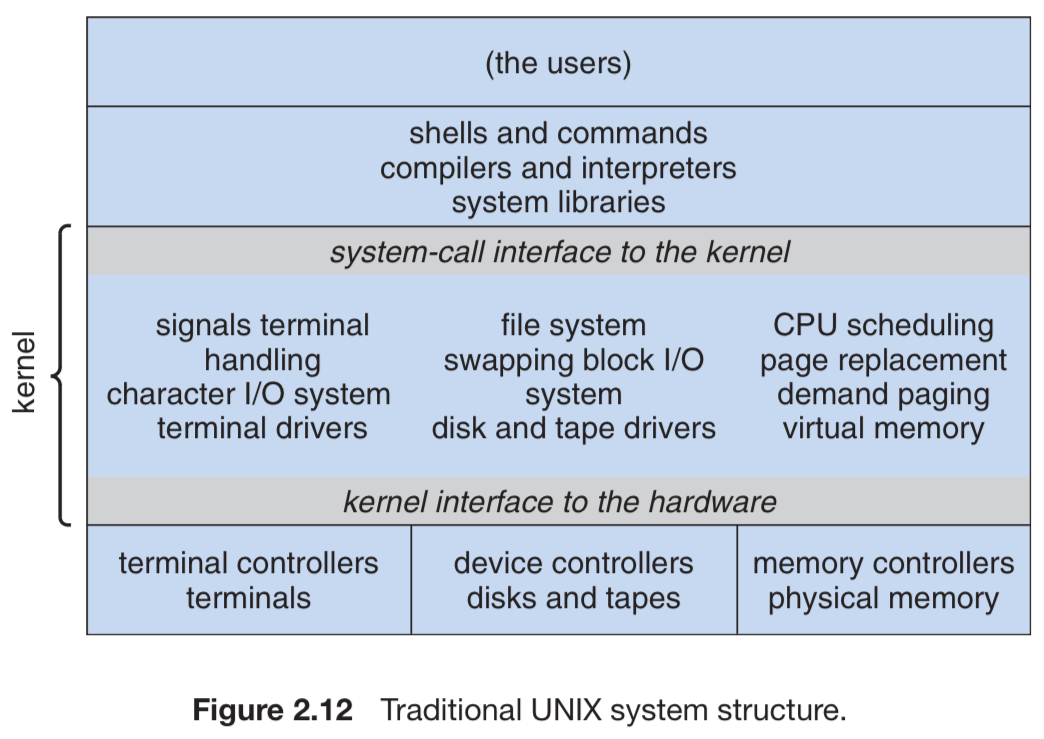
- Older OSes, like MS-DOS and UNIX, had relatively simple structure
- Monolithic structure of the UNIX kernel was very hard to maintain (interfaces and device drivers built into kernel), but very performant because of little overhead
Layered Approach
- Newer OSes are segmented, which allows the kernel to have more control over the system and applications
- Easier to modify system internals and create modular OSes
- Layered approach to modularization
- OS is broken into layers; each layer consists of data structures and a set of routines that can be invoked by higher layers
- Layer 0 is hardware and layer $n$ is the UI
- Each layer is implemented solely using lower-layer functions
- Problems:
- It’s difficult to appropriately define each layer in accordance with the functionality required by higher levels, so you may need to constantly revisit/redefine lower-layered definitions while building the system
- Inefficient because any calls originating from the highest layers must first pass through all the layers below it
- Compromise: a system with few layers that each contain high functionality
Microkernels
- Microkernel: nonessential components from the kernel are removed and implemented as programs
- Provide minimal process and memory management, and an exclusive communication facility
- The microkernel facilitates connections with services running in user space and clients using message passing
- Advantages:
- Extending the OS is much simpler, since any new additions can be written as programs
- If anything does have to be modified, it ends up being small
- Easier to port
- More secure, since most processes are running in user mode
- Extending the OS is much simpler, since any new additions can be written as programs
- Disadvantage: increased overhead, since system functions are disconnected from user processes
Modules
- Kernels have a set of core components and may incorporate additional services via loadable kernel modules at boot time or during run time
- This allows services to be linked to the kernel without having to recompile the entire kernel for every new change to the modules
- Any module can call any other module (in addition to the kernel)
- Resembles the microkernel approach, but without any of the overhead from message passing
Hybrid Systems
- Very few OSes have a distinct, well-defined structure; rather, they incorporate a combination of all of the above methods
- There’s a bunch of other subsections on the structure of recent OSes, but it’s irrelevant
OS Debugging
- Debugging: finding and fixing errors in a system
- Includes performance tuning: removing processing bottlenecks to improve performance
Failure Analysis
- Most OSes write error information to a log file if a process fails
- They can also write a core dump and store it in a file for volatile memory analysis
- A kernel failure is called a crash
- Error info is saved to a log file, and the memory state is saved to a crash dump
- To accomplish this independently of the error and devices, the kernel writes the crash dump into a section of the disk without a file system, then writes it to the crash dump file upon reboot
Performance Tuning
- Trace listings help identify bottlenecks in the kernel
- All “interesting” events are logged with their time and some important parameters
- This log can be read by an analysis file to determine system performance
- The traces are reproducible and may be fed into a system simulator with a modified kernel to determine whether performance improved
- Single-purpose, interactive tools help sysadmins question the state of system components and applications
topon UNIX displays resource usage- Windows Task Manager
- Other tools may display disk I/O, memory allocation, and network traffic
DTrace
- Dynamically adds probes to user processes and the kernel
- Each probe can be queried to determine information about the kernel, system state, and processes
- Different providers create different kinds of probes
- Lines ending in “U” are in user mode and “K” is kernel mode
- Before DTrace, kernel devs had to resort to:
- Breakpoints to examine the system state
- Profiling: a technique that periodically looks at the instruction pointer to see the code being executed (shows trends but not individual execution)
- Composition of DTrace: a compiler, a framework, probe providers, and probe consumers
- Steps of operation:
- DTrace probe providers create probes
- Kernel structures keep track of all created probes created in a hash table mapping names to unique identifiers
- When a probe is enabled, some machine code in the area to be probed is rewritten to call
dtrace_probe(identifier)and then the code resumes operation
- DTrace requires an interface with the kernel to work; thus, the compiler generates bytecode that is run by the kernel directly
- This allows for the enabling of probes, consumers in user mode, and communication between both
- This also means the DTrace program must be ran with elevated privileged (i.e., as root)
- A probe consumer is code that is interested in a probe and its results
- It requests the provider to create probes
- When a probe fires, it emits data that is managed by the kernel
- Enabling control blocks within the kernel contain predicates that allow filtering out the execution of the list of actions in the ECB
- Common action is to capture some bit of data, such as a variable at the point of probe execution
- Once the consumer terminates, the corresponding ECBs are removed
OS Generation
- SYSGEN: Using a description of the system (via reading from files or asking the user) to generate a specially-tailored OS
- Typically used at the installation stage of an OS; the system description creates tables and selects modules from a precompiled library that are linked to form the generated OS
System Boot
- This section reiterated a lot from Bootstrapping and Boot Time
- Bootstrappers execute the code from within an OS’s boot block at a fixed disk location
References
- Course slides: Operating System Structures
- Practice 2 solutions
Sources
- Course slides: Operating System Structures
- Practice 2 solutions
- Silberschatz, Galvin & Gagne, Operating System Concepts Essentials