Notes › Operating System Concepts Essentials (Silberschatz) Lecture 1
Introduction
3731 words 21 min Modified
Table of Contents
Operating Systems
Definition 01.1 (Operating System).
A program that:
- Manages a computer’s hardware
- Provides a basis for applications
- Acts as an intermediary between the user and dhardware
- Different OSes can exist for different tasks
What OSes Do
- A computer system can be divided into four components:
- Hardware
- OS
- Applications
- Users
- To understand the role of the OS, we need to closely examine the viewpoint of the user and the system
User View
- Most users interact with their computer via a keyboard, mouse, and monitor
- Such a system would have an OS that only allows for one user at a time; this allows the currently logged-in user to monopolize the computer’s resources
- This OS would be designed primarily for ease of use (which implies complex graphics and interaction) with some attention for performance (since there are many applications), but a complete disregard for resource utilization (how hardware/software resources are shared)
- Some users sit at a terminal connected to a mainframe/minicomputer
- Other users can access the same computer remotely using their own terminal
- Important note: the terminal requires very little interaction complexity (i.e., it just needs to print text output, so no complex graphics needed; also, no need for a mouse)
- Since multiple terminals can access the same computing device, the OS has to support concurrent user sessions and maximize resource utilization (efficiently allocate the hardware/software across the logged-in users)
- Other users can access the same computer remotely using their own terminal
- Some users can sit at a workstation connected to a network consisting of other workstations and a server
- The network is also connected to file, compute, and print servers, access to which are shared between the workstations
- The server needs to support multiple concurrent graphical sessions with applications while allocating compute resources effectively on a per-user basis
- Thus, a compromise between usability and resource utilization is reached
- Most people nowadays have phones, which feature a touch screen for interaction rather than a keyboard and mouse
- Mobile phones have OSes that support applications and graphics just like normal computers; albeit, at a smaller scale
- Some computers have little to no user view
- Embedded systems involving microcontrollers, such as smart light controllers, computers inside cars, etc.
- These systems are designed to run without user intervention, although sometimes they can be physically taken apart and interacted with on a hardware level
System View
- The OS may be viewed as a resource allocator, since it is the program most intimately involved with the hardware
- It must manage the following resources when performing any action:
- CPU time
- Memory space
- File-storage space
- I/O devices
- The OS must also act as a control program, in which it manages the execution of user programs to prevent errors and improper use of the computer
- This means it is primarily concerned with the operation and control of I/O devices, since that’s where conflicts occur the most
Defining OSes More Rigorously
- In truth, there is no universally accepted definition of an OS
- This is due to the diverse range of features and use cases that different OSes come shipped with
- Most people would agree, however, that the OS is the one program running all the time on the computer, known as the kernel
- Along with the kernel, there are system programs and applications
- System programs aren’t part of the kernel itself, but help the user interface directly with the kernel (such as modifying system settings)
- Over time, the number of integrated features and software within OSes has increased
- This is, in part, due to Moore’s Law and the increasing complexity of software/hardware in general, which requires additional features layered in with the OS
- Most OSes include middleware, which is a set of software frameworks that allow application developers to interface with the kernel
- Mobile OSes such as Android/iOS include middleware that has support for databases, multimedia, and graphics
- Desktop OSes such as UNIX/Windows have APIs that allow software developers to use core features within the system from within their code
System Organization
System Operation
Modern Computing Configuration Layout
- Memory is accessed via a shared bus between components, such as:
- One or more CPUs
- Device controllers, such as the disk controller, USB controller, and graphics adapter
- The CPU and device controllers execute independently of one another, so a separate memory controller is needed to synchronize access to shared memory
Bootstrapping
- The bootstrap program (bootstrapper) is the very first program that runs when a computer is powered on
- It is stored within the firmware, which is a general term to refer to anything in read-only memory within the hardware
- Responsible for initializing CPU registers, device controllers, shared memory, and the OS
- To initialize the OS, the bootstrapper must load the kernel into memory
Boot Time
- Once the kernel is loaded, it is time to serve content to the receiving users
- Services/Daemons are loaded into memory at boot time
- They are separate from the kernel and spawn other services that are necessary for the user to interact with the OS
- The first daemon on UNIX is
init, which is responsible for starting all necessary/preconfigured services
- After this process is complete, the OS is fully booted (do not confuse the verb “boot” with bootstrapping, which is a separate process altogether, as previously mentioned) and waits for any event to occur
Interrupts
- In order to signify an “event” to the OS, an interrupt is performed
- Hardware may trigger interrupts at any time by sending a signal to the CPU via the shared bus (this method has the lowest latency)
- Software may trigger interrupts by executing system/monitor calls
- Interrupts force the CPU to begin executing at the starting address of the interrupt service routine
- Since there are many types of interrupts, there are also many corresponding interrupt service routines that are directly responsible for the behavior of the interrupt
- For this reason, there is a table of hardcoded pointers, the interrupt vector, stored in low memory that hold the addresses of the interrupt routines for each device
- The interrupt vector is indexed by the unique identifier corresponding to the device performing the interrupt request to ensure the proper service routine address is retrieved
- Once the service routine has finished executing, the interrupt is completed, and the CPU returns to the original task
- It restores the CPU’s previous state (registers, program counter, etc.)
- The CPU resumes execution as though it was never interrupted
Storage Structure
Memory
- All instructions for the CPU to load are stored in memory
- RAM is most common because it is highly dynamic and rewritable
- ROM is used for applications that require immutability; it is unique because it cannot be written to (read-only)
- For example, the bootstrapper is in ROM because you don’t want to modify it
- Memory is an array of bytes
- Each byte has its own address
- Interaction with memory is done through
loadandstoreinstructions;loadmoves a byte/word from memory into a CPU register andstoredoes the opposite - In addition to explicit calls for
loadandstore, CPU automatically loads instructions from main memory for execution
Instruction-Execution Cycle
-
Systems with a von-Neumann architecture undergo the following process for executing an instruction:
- Fetch instruction from memory and store it in the instruction register
- Decode the instruction
- The operands of the instruction are fetched from memory and stored in an internal register
- Store the result in memory
-
The memory controller only sees the memory addresses themselves; it doesn’t know how those addresses were generated, which could have been by:
- The instruction counter
- Indexing
- Indirection
- Literal addresses
-
The memory controller also does not know what the memory addresses are being used for, which could be: instructions or data
Problems with Memory
- The problem of finite memory
- We wish we could store programs and data in memory indefinitely, but it’s not feasible because main memory is too small to accommodate these needs of infinite desire
- This is more of a scarcity issue than anything; in an ideal world, it would be possible, but it just isn’t from a hardware and resource availability perspective
- The problem of volatility
- Main memory is volatile and loses its contents when power is lost
- Most computers have secondary storage to hold data permanently (nonvolatile), but the trade-off is that it’s slower
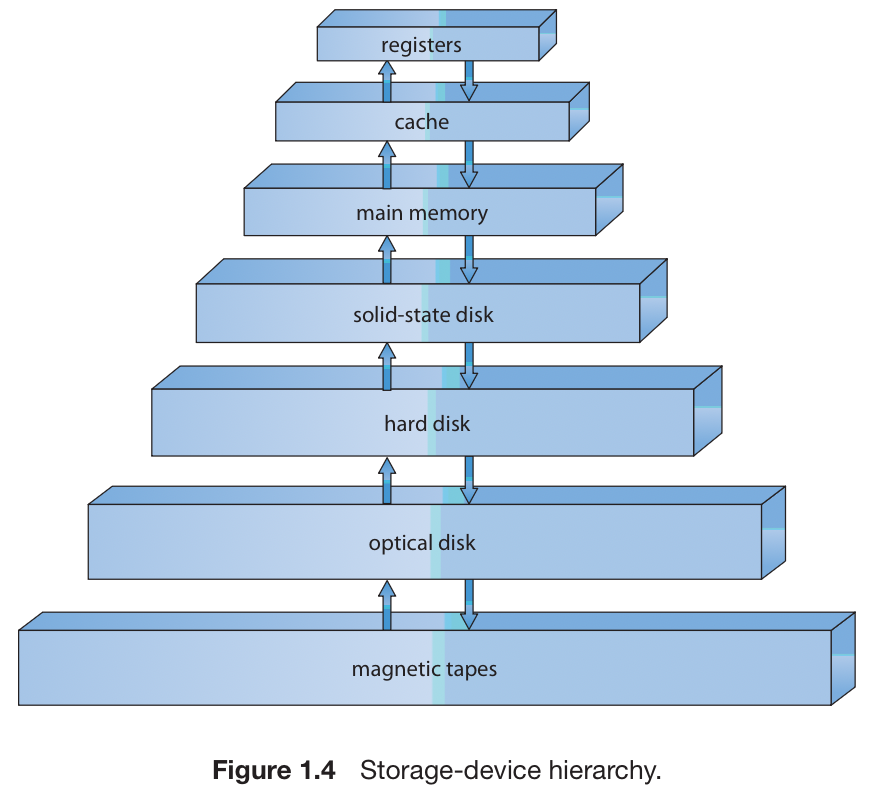
- There are many types of storage systems (shown below) that are used in computing; as you move down, the cost per unit of memory decreases, but the access time increases
- The first four levels are considered semiconductor memory because they are made of semiconductors and have generally quick access time
- Advances in semiconductor sizing (in accordance with Moore’s Law) have made the performance gains of semiconductor memory exponentially grow over time while still remaining relatively low-cost
- The first four levels are considered semiconductor memory because they are made of semiconductors and have generally quick access time
I/O Structure
Overview
- An important capability of OSes is managing I/O operations due to its importance for system reliability and performance
- Multiple devices of the same type may be connected to a single controller, such as a small computer-systems interface (SCSI) controller
- Controllers have buffer storage and special-purpose registers that help them manage data between devices
- Each device controller also has a device driver that interfaces with the OS
I/O Operations
- This is the cycle for an I/O operation:
- The device driver loads the registers within the controller
- Using the current contents of the registers, the device controller determines an action to take
- The controller transfers data from the device to its buffer
- The device controller tells the device driver that the operation is complete via an interrupt
- The device driver returns control to the OS
- It could potentially also return the data or a pointer to the data if the operation was a read, or perhaps just return status information in general
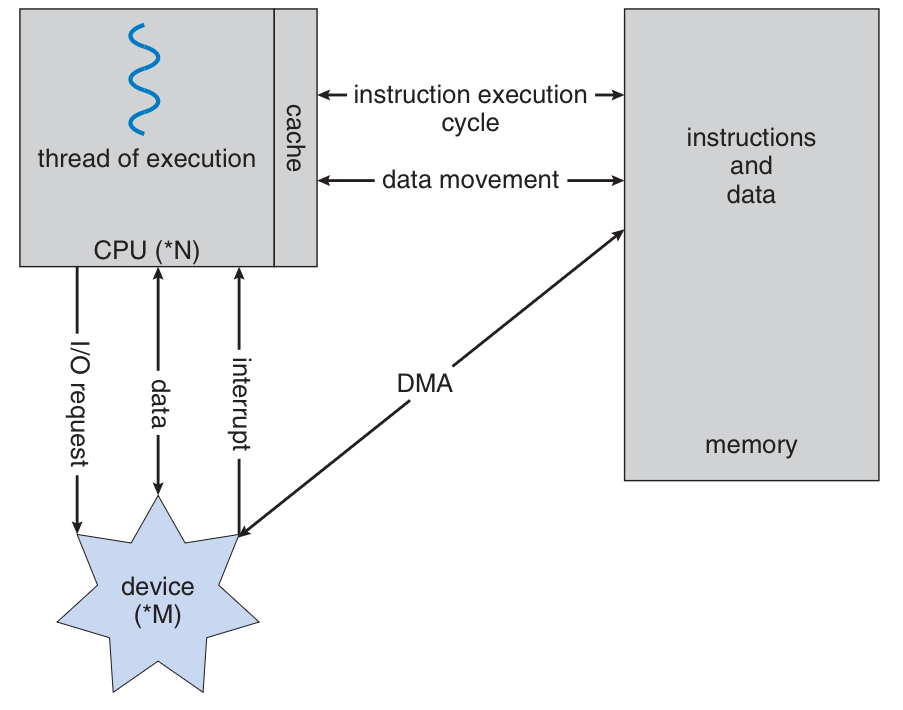
- However, the aforementioned cycle has high overhead when dealing with large amounts of data, such as disk operations
- Direct memory access (DMA) is the solution
- The controller preinitializes buffers, pointers, and counters for the device so that it can transfer entire blocks of data to the main memory without needing the CPU
- With this method, one interrupt is generated per block rather than per byte
- DMA allows the CPU and device controller to work in parallel
- Direct memory access (DMA) is the solution
System Architecture
Single Processor
- A single-processor system has one main CPU capable of executing a general-purpose instruction set
- It may also include special-purpose processors
- Disk controllers, keyboard controllers, graphics controllers
- I/O processors in mainframes
- These special-purpose processors run limited instruction sets and do not run user processes
- They can be managed by the OS or operate autonomously
- As long as there is only one general-purpose CPU, the system is single-processor
Multiprocessor Systems
- Multiprocessor (parallel, multicore) systems contain two or more processors in close communication
- Processors share bus, memory, and devices
- Advantages:
- Increased throughput, though less than linear with N processors due to overhead and contention
- Economy of scale through shared resources
- Increased reliability via graceful degradation or fault tolerance
- Two models:
- Asymmetric multiprocessing: one boss processor and multiple workers
- Symmetric multiprocessing (SMP): all processors are peers, performing all tasks
- Modern OSes such as Windows, macOS, and Linux support SMP
- Multiprocessing can change memory access models:
- UMA: equal access time to all memory
- NUMA: varying access times depending on memory location
- Multicore CPUs place multiple cores on one chip
- Faster on-chip communication
- Lower power usage than multiple single-core chips
- Blade servers: multiple boards in one chassis, each with its own OS, sometimes multiprocessor
Clustered Systems
- Clustered systems join multiple individual systems (nodes) together
- Nodes may be single-processor or multicore
- Nodes share storage and are connected via LAN or high-speed interconnect
- Used for:
- High availability (failover through redundancy)
- High-performance computing (parallelization across nodes)
- Structures:
- Asymmetric clustering: one machine in hot-standby
- Symmetric clustering: all nodes run applications and monitor each other
- Variants:
- Parallel clusters: multiple hosts access same shared storage
- Require distributed lock managers (DLMs) for access control
- Beowulf clusters: built from commodity hardware and open-source software, often Linux-based
- Low-cost, high-performance computing solution
- Parallel clusters: multiple hosts access same shared storage
- Modern cluster technology uses SANs to allow many systems to attach to shared storage
Operating-System Structure
Multiprogramming
- A single program cannot keep CPU and I/O devices fully busy
- Multiprogramming organizes multiple jobs in memory so CPU always has work
- Jobs stored in a job pool on disk, awaiting allocation into memory
- OS executes jobs in memory, switching when one job must wait
- Ensures CPU utilization is maximized
Time Sharing
- Logical extension of multiprogramming
- CPU switches between jobs so frequently that users can interact with programs directly
- Requires:
- Interactive input/output
- Response times typically under 1 second
- Each user gets impression of full system access
- Uses CPU scheduling and multiprogramming
- Programs in memory are called processes
- Processes often pause for I/O; OS switches CPU to other processes
- Requires:
- Job scheduling (deciding which jobs load into memory)
- CPU scheduling (deciding which process runs first)
- Memory management
- Synchronization and communication
- Deadlock avoidance
- Swapping and virtual memory used to ensure responsiveness
- Virtual memory lets processes run larger than physical memory
- Must provide file system, disk management, protection, synchronization
Operating-System Operations
Interrupts and Traps
- OSes are interrupt driven
- Events signaled by:
- Interrupts (hardware signals)
- Traps/exceptions (software-generated, e.g., errors, system calls)
- Each interrupt handled by a service routine
Protection
- Multiple processes share hardware and software resources
- Errors in one program must not affect others
- OS must ensure faulty or malicious programs cannot compromise system
Dual-Mode and Multimode Operation
- Two main modes:
- User mode: for applications
- Kernel mode: for OS
- Hardware includes a mode bit (0 for kernel, 1 for user)
- At boot, system starts in kernel mode, then launches applications in user mode
- System calls or interrupts switch mode from user to kernel
- Privileged instructions (I/O control, timer, interrupt management) only run in kernel mode
- Ensures OS protection from users and isolation between users
- Some CPUs extend beyond dual-mode for virtualization (VMM mode) or kernel components
Timer
- Interrupts the CPU after a specified period
- Useful so that user programs that don’t return control to the OS are ended
- Can be fixed or variable
- Variable: fixed-rate clock and counter that is decremented
Process Management
- Processes compete for resources
- Program counter: specifies the next instruction to execute
- Multithreaded processes have multiple program counters
- Each process may only execute one instruction at a time
Memory Management
- RAM is the only storage device that CPUs have access to
- Programs must be mapped to addresses in order to be loaded in memory
- These addresses are generated as the program executes
- The addresses are used to access instructions and data
- The OS must decide on a management scheme to:
- Monitor in-use RAM and the processes using RAM
- Deciding processes and data to move in/out of RAM
- Allocating/Deallocating RAM
Storage Management
File-System Management
- Files are highly general and organized into directories (the file system)
- OS is responsible for:
- Creating/Deleting files and directories
- Supporting primitives for manipulating the file system
- Mapping files onto secondary storage
- Backing up the file system
Mass-Storage Management
- Computers need secondary storage to back up RAM
- Most systems use disks for this
- Disk management is important; the OS must manage the following:
- Free space management
- Storage allocation
- Disk scheduling
- Tertiary storage devices are used to archive/backup data in the long term
- Write-once, read-many-times (WORM)
- Read-write (RW)
- OSes help manage tertiary devices via data migrating and mounting/unmounting
Caching
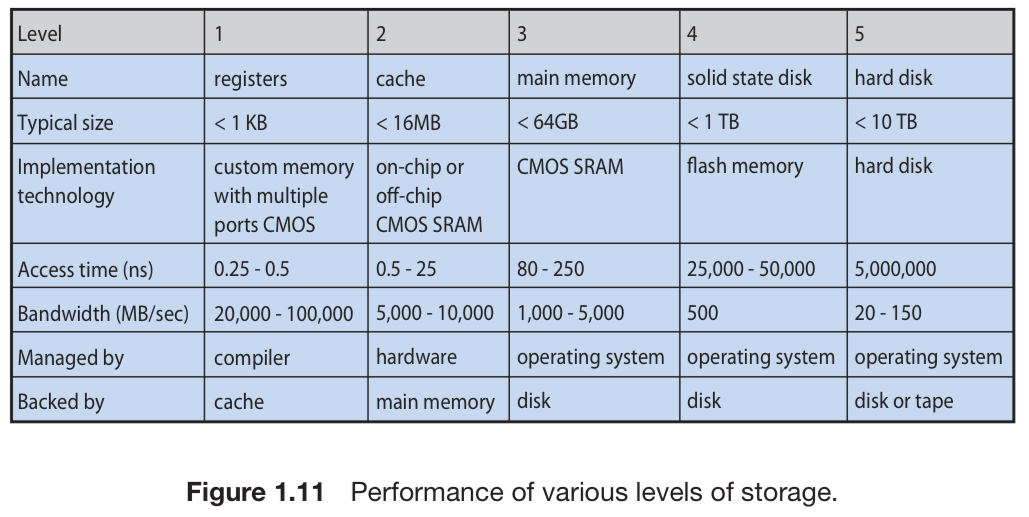
- Caching: Temporary information is periodically copied to cache, which is faster-accessible to the CPU
- Internal registers: Frequently-used information from RAM is allocated to registers; directly-accessible to CPU; faster than cache
- Compiler uses highly-optimized algos to automatically allocate and replace register info
- Cache management: the OS decides the cache size and replacement policy when moving between levels of the storage hierarchy
- Copies of data ($A$) can exist concurrently in various storage systems
- Multitasking environment: ensure different processes with access to $A$ are using the same, most recent copy of $A$
- Multiprocessor environment: each CPU has a local cache, so there are different copies of $A$ on different CPUs
- Cache coherency: since the CPUs are executing concurrently, each update to $A$ must be reflected in any other CPU cache in which $A$ resides; this is handled at the hardware level
- Distributed environment: several copies of $A$ may exist on different computers, each of which may be accessed concurrently; must ensure that any one such copy of $A$ will update the other copies when updated
I/O Systems
- Hardware devices have special quirks and handling methods
- The OS provides a uniform interface for the user and system to interact with different devices consistently
- Any device-specific irregularities are handled by device drivers
- The OS also helps manage memory of devices: buffering, caching, spooling
Protection and Security
- Protection: the OS controls access of processes/users to data; this is specified by:
- The means of control
- The means of enforcement
- Improves system reliability by exposing faults that are not immediately visible
- Prevents an entire cascading of errors at the system level
- Provides for the distinction of authorized and unauthorized usage for a system
- Systems can have adequate protection and still allow inappropriate access; Security is primarily concerned with defense against attacks
- OSes have a list of user names and associated unique identifiers
- UID on UNIX, SID on Windows
- Groups allow distinguishing between sets of users with group permissions; thus, OSes have a list of user groups and associated unique group identifiers (GID)
- Sometimes, a user needs to privilege escalate to gain extra permissions for something
- UNIX:
setuid: program runs with UID of the file owner (effective UID)
- UNIX:
Kernel Data Structures
Lists, Stacks, and Queues
List
- Singly linked list: each element points to its successor
- Doubly linked list: each element points to its predecessor and successor
- Circularly linked list: last element refers to first element instead of
null - Disadvantage: access time is $O(n)$ due to list traversal
Stack
- LIFO
- Insertion is
push, removal ispop - Often used by OS when invoking function calls
- Parameters, local variables, and ret address are pushed onto the stack and popped when the function is returned
Queue
- FIFO
- Example usage: printing jobs
Trees
- Data represented via parent-child relationships
- General tree: parents have unlimited children
- Binary tree: parents have at most 2 children: left and right child
- Binary search tree (BST): special case in which
left_child<=right_child- $O(n)$ access time
- Balanced BST: the tree has at most $\log n$ levels
- $O(\log n)$ access time
- Used by Linux for CPU-scheduling algorithm
- Binary search tree (BST): special case in which
Hash Functions and Maps
- Hash function: performs a numeric operation on an input and returns a number
- This output can be used to index an array in $O(1)$ time
- Hash collision: two inputs can have the same output
- Solution: Create a linked list that stores all items with the same hash value
- This introduces slightly more overhead, especially if hash collisions are rare; but if they are average/common, then it’s useful (although, you shouldn’t be using a hash function that has a lot of collisions to begin with)
- Hash map: maps keys to values using a hash function
- Used for password retrieval and creating constant-time references in an OS
Bitmaps
- Bitmap: string of binary to represent the status of $n$ items
- Used when there is a need to represent the availability of a large number of resources
- Example: disk drives are divided into several thousand disk blocks; a bitmap may be used to represent the availability of each clock
Computing Environments
Traditional Computing
- Older office environments had some PCs connected to a network with file/printer services
- These environments had poor accessibility and portability
- Newer environments have portals for Web acessibility
- Network computers (thin clients) are used in place of traditional workstations, in which all processing, applications, and storage are done serverside
- Lower cost: less intensive hardware specs
- Easier management: software updates can be deployed centrally
- Higher security: data is on the central server
- Scalable: adding/replacing clients is fast
- Firewalls protect networks from security breaches
Mobile Computing
- Nothing I didn’t already know
Distributed Systems
- Distributed system: collection of physically separate computer systems that are networked to provide access to shared resources
- Network: a communication path between multiple systems
- TCP/IP is the most common network protocol, and most OSes support it
- Networking protocols need an interface device and a device driver
- LAN connects within a room/building/campus
- WAN connects buildings/cities/countries
- Network OS: provides file sharing across network and a communication scheme for processes on different computers to communicate; operates autonomously from all other devices on a network
Client-Server Computing
- Many of today’s systems are server systems build to satisfy requests from clients
- Compute-server system: interfaces with the client to perform actions on the server and return a response
- File-server system: clients can create/update/read/delete files
Peer-to-Peer Computing
- All nodes are considered peers and may be a client or server, depending on whether it is requesting or providing a service
- There is little latency since there is no bottleneck introduced by one server, and also due to additional nodes providing the service (which also adds redundancy)
- Making a service known to the network is accomplished via:
- A peer registers its service with a network-wide lookup service
- A peer broadcasts a request for a service to all other peers via a discovery protocol
Virtualization
- Run OSes as applications within other OSes
- Emulation: source CPU type is different from target CPU type; requires a translation layer to convert the instruction sets
- Commonly used when interpreting the high-level code of a programming language; the code is converted to some kind of byte code that is further interpreted into machine code, not by another CPU, but by a theoretic virtual machine
- Emulation: source CPU type is different from target CPU type; requires a translation layer to convert the instruction sets
- Virtual machine managers (VMM) allow installation and interaction with multiple OSes
Cloud Computing
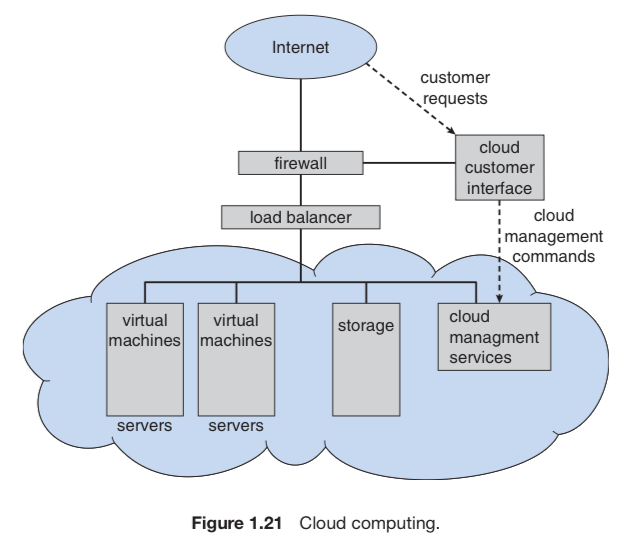
- Delivers computing, storage, and applications as a service across a network
- Uses virtualization as the core of its functionality
- Types:
- Public cloud: service over the Internet for anyone that can pay
- Private cloud: service run by a company for internal use
- Hybrid cloud: cloud with private and public components
- SaaS: applications over the Internet
- PaaS: software stack over the Internet to be used by multiple applications (i.e., databases)
- IaaS: servers/storage over the Internet
- Cloud computing environments may provide several of the above types
Real-Time Embedded Systems
- Embedded systems have very specific tasks and run on primitive systems, so the corresponding OSes are limited
- Application-specific integrated circuits (ASIC): hardware that can perform tasks without an OS
- Real-time OSes: used when there is a time constraint on computation or flow of data
- Must return the correct result within the time constraint!
Open-Source OSes
- Linux exists and is cool
- MacOS has some open source kernel stuff
- Viewing source code can help you learn more about OS functionality and implementation
References
- Course slides: Overview and OS Basics
- Practice 1 solutions
Sources
- Course slides: Overview and OS Basics
- Practice 1 solutions
- Silberschatz, Galvin & Gagne, Operating System Concepts Essentials